
Email
Update: eFiling tips and tricks
| From | Minnesota Office of Administrative Hearings <[email protected]> |
| Subject | Update: eFiling tips and tricks |
| Date | October 11, 2022 5:50 PM |
Links have been removed from this email. Learn more in the FAQ.
Links have been removed from this email. Learn more in the FAQ.
Workers' Comp eFiling
OAH Logo
Tips and tricks for eFiling at OAH
Thank you!
Thank you to the *133 people* who attended our fall tips and tricks events!
Below are *five common tips* to remember when eFiling.
1. Use the WID, not the Campus employee ID
When you add the employee, enter only the *WID: no leading zeroes, no dashes.*
Remember, nothing has changed at OAH. DLI's Campus system uses an *employee ID number. *The Campus employee ID is formatted as *EE-##-####-### and may contain leading zeroes. C-Track and OAH do not use the Campus employee ID number.*
For example...
Employee A's *Campus employee ID number* is EE-00-0123-456. Employee A's *WID* is 123456.
Employee B's *Campus employee ID number* is EE-98-7654-321. Employee B's *WID* is 987654321.
2. Don't use social security numbers
OAH does not use social security numbers, and our system doesn't have a place to store them. Only file using the *WID.*
*3. Don't include intervenors*
*Do not* enter potential intervenors as parties when filing a new case (unless you are filing a Request for Formal Hearing or Stipulation for Settlement as a new case). Intervenors must file a motion before they can be added as parties. Intervenors may be added on Requests for Formal Hearing and Stipulations for Settlement.
4. Link attorneys to the parties they represent
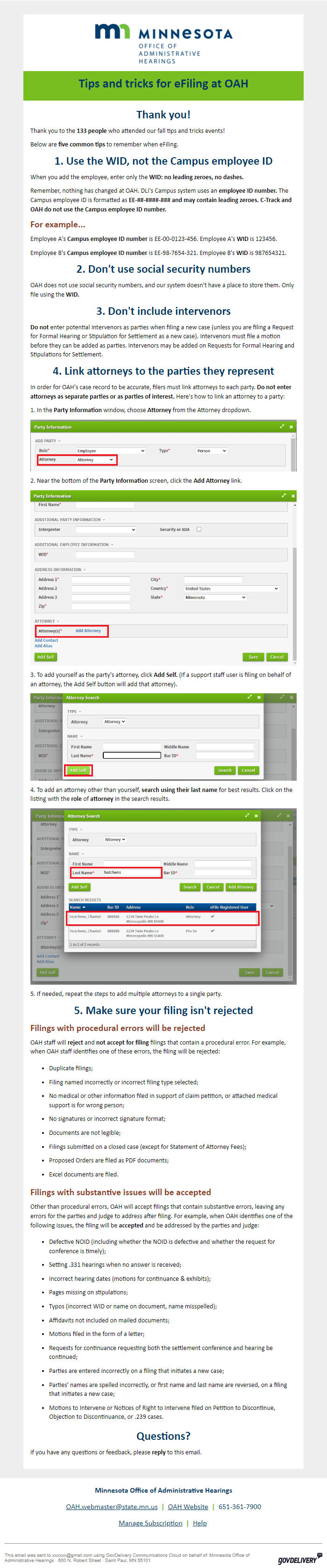
In order for OAH's case record to be accurate, filers must link attorneys to each party. *Do not enter attorneys as separate parties or as parties of interest.* Here's how to link an attorney to a party:
1. In the *Party Information *window, choose *Attorney* from the Attorney dropdown.
Attorney dropdown screenshot
2. Near the bottom of the *Party Information* screen, click the *Add Attorney* link.
Add Attorney link screenshot
3. To add yourself as the party's attorney, click *Add Self.* (If a support staff user is filing on behalf of an attorney, the Add Self button will add that attorney).
Add Self button screenshot
4. To add an attorney other than yourself, *search using their last name* for best results. Click on the listing with the *role* of *attorney* in the search results.
Attorney search screenshot
5. If needed, repeat the steps to add multiple attorneys to a single party.
5. Make sure your filing isn't rejected
Filings with procedural errors will be rejected
OAH staff will *reject* and *not accept for filing* filings that contain a procedural error. For example, when OAH staff identifies one of these errors, the filing will be rejected:
* Duplicate filings;
* Filing named incorrectly or incorrect filing type selected;
* No medical or other information filed in support of claim petition, or attached medical support is for wrong person;
* No signatures or incorrect signature format;
* Documents are not legible;
* Filings submitted on a closed case (except for Statement of Attorney Fees);
* Proposed Orders are filed as PDF documents;
* Excel documents are filed.
Filings with substantive issues will be accepted
Other than procedural errors, OAH will accept filings that contain substantive errors, leaving any errors for the parties and judge to address after filing. For example, when OAH identifies one of the following issues, the filing will be *accepted* and be addressed by the parties and judge:
* Defective NOID (including whether the NOID is defective and whether the request for conference is timely);
* Setting .331 hearings when no answer is received;
* Incorrect hearing dates (motions for continuance & exhibits);
* Pages missing on stipulations;
* Typos (incorrect WID or name on document, name misspelled);
* Affidavits not included on mailed documents;
* Motions filed in the form of a letter;
* Requests for continuance requesting both the settlement conference and hearing be continued;
* Parties are entered incorrectly on a filing that initiates a new case;
* Parties' names are spelled incorrectly, or first name and last name are reversed, on a filing that initiates a new case;
* Motions to Intervene or Notices of Right to Intervene filed on Petition to Discontinue, Objection to Discontinuance, or .239 cases.
Questions?
If you have any questions or feedback, please *reply* to this email.
*Minnesota Office of Administrative Hearings*
[email protected] *| * OAH Website [ [link removed] ] *|* 651-361-7900
Manage Subscription [ [link removed] ] *|* Help [ [link removed] ]
________________________________________________________________________
This email was sent to [email protected] using GovDelivery Communications Cloud on behalf of: Minnesota Office of Administrative Hearings · 600 N. Robert Street · Saint Paul, MN 55101 GovDelivery logo [ [link removed] ]
OAH Logo
Tips and tricks for eFiling at OAH
Thank you!
Thank you to the *133 people* who attended our fall tips and tricks events!
Below are *five common tips* to remember when eFiling.
1. Use the WID, not the Campus employee ID
When you add the employee, enter only the *WID: no leading zeroes, no dashes.*
Remember, nothing has changed at OAH. DLI's Campus system uses an *employee ID number. *The Campus employee ID is formatted as *EE-##-####-### and may contain leading zeroes. C-Track and OAH do not use the Campus employee ID number.*
For example...
Employee A's *Campus employee ID number* is EE-00-0123-456. Employee A's *WID* is 123456.
Employee B's *Campus employee ID number* is EE-98-7654-321. Employee B's *WID* is 987654321.
2. Don't use social security numbers
OAH does not use social security numbers, and our system doesn't have a place to store them. Only file using the *WID.*
*3. Don't include intervenors*
*Do not* enter potential intervenors as parties when filing a new case (unless you are filing a Request for Formal Hearing or Stipulation for Settlement as a new case). Intervenors must file a motion before they can be added as parties. Intervenors may be added on Requests for Formal Hearing and Stipulations for Settlement.
4. Link attorneys to the parties they represent
In order for OAH's case record to be accurate, filers must link attorneys to each party. *Do not enter attorneys as separate parties or as parties of interest.* Here's how to link an attorney to a party:
1. In the *Party Information *window, choose *Attorney* from the Attorney dropdown.
Attorney dropdown screenshot
2. Near the bottom of the *Party Information* screen, click the *Add Attorney* link.
Add Attorney link screenshot
3. To add yourself as the party's attorney, click *Add Self.* (If a support staff user is filing on behalf of an attorney, the Add Self button will add that attorney).
Add Self button screenshot
4. To add an attorney other than yourself, *search using their last name* for best results. Click on the listing with the *role* of *attorney* in the search results.
Attorney search screenshot
5. If needed, repeat the steps to add multiple attorneys to a single party.
5. Make sure your filing isn't rejected
Filings with procedural errors will be rejected
OAH staff will *reject* and *not accept for filing* filings that contain a procedural error. For example, when OAH staff identifies one of these errors, the filing will be rejected:
* Duplicate filings;
* Filing named incorrectly or incorrect filing type selected;
* No medical or other information filed in support of claim petition, or attached medical support is for wrong person;
* No signatures or incorrect signature format;
* Documents are not legible;
* Filings submitted on a closed case (except for Statement of Attorney Fees);
* Proposed Orders are filed as PDF documents;
* Excel documents are filed.
Filings with substantive issues will be accepted
Other than procedural errors, OAH will accept filings that contain substantive errors, leaving any errors for the parties and judge to address after filing. For example, when OAH identifies one of the following issues, the filing will be *accepted* and be addressed by the parties and judge:
* Defective NOID (including whether the NOID is defective and whether the request for conference is timely);
* Setting .331 hearings when no answer is received;
* Incorrect hearing dates (motions for continuance & exhibits);
* Pages missing on stipulations;
* Typos (incorrect WID or name on document, name misspelled);
* Affidavits not included on mailed documents;
* Motions filed in the form of a letter;
* Requests for continuance requesting both the settlement conference and hearing be continued;
* Parties are entered incorrectly on a filing that initiates a new case;
* Parties' names are spelled incorrectly, or first name and last name are reversed, on a filing that initiates a new case;
* Motions to Intervene or Notices of Right to Intervene filed on Petition to Discontinue, Objection to Discontinuance, or .239 cases.
Questions?
If you have any questions or feedback, please *reply* to this email.
*Minnesota Office of Administrative Hearings*
[email protected] *| * OAH Website [ [link removed] ] *|* 651-361-7900
Manage Subscription [ [link removed] ] *|* Help [ [link removed] ]
________________________________________________________________________
This email was sent to [email protected] using GovDelivery Communications Cloud on behalf of: Minnesota Office of Administrative Hearings · 600 N. Robert Street · Saint Paul, MN 55101 GovDelivery logo [ [link removed] ]
Message Analysis
- Sender: n/a
- Political Party: n/a
- Country: n/a
- State/Locality: n/a
- Office: n/a
-
Email Providers:
- govDelivery